
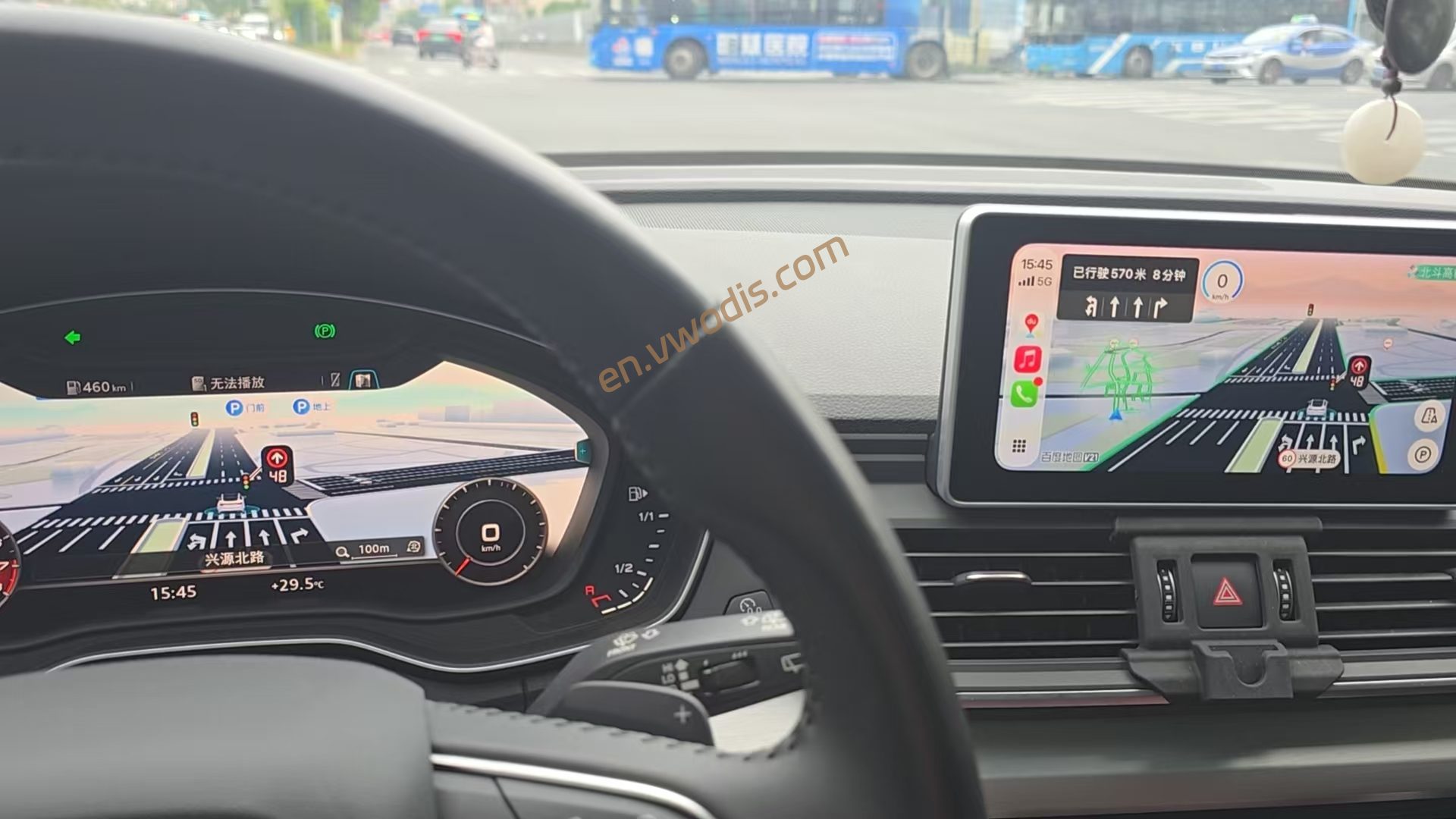
This software is designed for the Audi MHI2Q platform. It directly renders the native CarPlay AltScreen / second-screen navigation onto the vehicle’s Virtual Cockpit. The core display pipeline has been verified on real vehicles.
The AUG22 firmware for the China (CN) region has undergone real-vehicle testing and works properly.
Some AUG22 firmware variants for Europe (ER) have been reported functional by users in real cars (examples: MHI2Q_ER_AUG22_P5092 / P5152, MU 1329).
Firmware for other ER releases, US and other regions may contain unknown bugs. Full compatibility is not guaranteed. Please assess risks on your own and keep a full backup of your original factory firmware.
improves second-screen sessions, RGI state recovery, and installation/restore safeguards, and adds manual rescue restore.
Fixes
- Second-screen connection and teardown: Fix races in overlapping sessions, video capture, and deferred cleanup; isolate old sessions from new ones. Correct generation tracking after failed SETUP and deferred audio teardown filtering so old cleanup does not remove a replacement stream. Improve retry pacing, firewall cleanup, and thread shutdown handling.
- RGI and OEM navigation state: Improve interception recovery after navigation-service replacement, RGI thread/connection recovery, and state restoration on disconnect. Fall back to the compatible path when context 81 is unavailable, and correct Q7 layout handling.
- Diagnostics and logging: Extend audio-link diagnostics; fix mixed cold-start logs, recovery after capture failures, log-size parsing, and several unbounded logs. Installation/restore step output is saved as it arrives, preserving emitted details if an operation is forcibly killed.
- Stock-backup protection: Validate backup completeness and the recorded firmware train. Normal restore keeps binary/configuration content checks and refuses unverified replacements. Fix false rollback-success reports, missing package prechecks, and misleading results after interrupted operations. Rescue snapshots do not replace clean stock backups.
- Manual rescue: Create the empty SD file
MMI-Cockpit-Carplay/RESCUE_RESTORE. Manual restore can then recover differing or damaged system binaries and configurations from a complete clean backup for the same head-unit model and exact firmware train. Firmware mismatches remain refused; legacy backups without a recorded train cannot rescue. VIN mismatches produce warnings. INSTALL’s automatic uninstall retains strict checks. - Rescue result messages: Distinguish a missing marker, rescue failure, successful rollback, and incomplete rollback, with specific next steps. Successful rollback restores the pre-rescue state, which may still be damaged; messages explain keeping/replacing the marker and retrying RESTORE after correcting the error. Lock contention is reported separately instead of being mislabeled as a backup/firmware mismatch. VIN warnings are deduplicated in progress output and included in the final RESULT.
Use and validation
After updating Toolbox, the green-menu entry is mmi-cockpit-carplay, with V3.7 as its internal title. Both INSTALL NO RGI and INSTALL WITH RGI remain available.
Keep separate computer copies of your own stock backup, SD contents, and logs. Borrow only a clean backup from the same head-unit model and exact full firmware train. After RESCUE SUCCESS, remove the marker and fully reboot. Both RESTORE ORIGINAL and STORE LOGS + RESTORE recognize the marker; leaving it present keeps subsequent manual restores in rescue mode. INSTALL never enables rescue automatically.
Local host and simulated head-unit tests passed for installation/restore, backup protection, fault rollback, and result messages. The rescue suite passed 32 cases; the latest message fixes and related regressions passed 74 cases. The new rescue mode and message fixes still require vehicle validation. Earlier Fix3 vehicle validation does not establish validation of these new changes.
-
$FreeDownload after commentDownload after login
- {{attr.name}}:
1.Virtual products, once purchased, do not accept any form of refund! If you cannot accept the above agreement, please do not place an order!
2.Virtual products, remote guidance is not accepted! If you cannot accept the above agreement, please do not place an order!
3.All the resources of this site come from the network. Please contact the administrator if your rights and interests are infringed. We will review and delete them at the first time in Email:admin@vwodis.com The resources on the site are used for personal study or test research by netizens. Without the permission of the original copyright author, they are not allowed to be used in any commercial way! Please delete within 24 hours of downloading!